
Kapwing: A Great Tool for Creating Captioned Videos & More!
By SHARON HENDERSON
Creating video content today means more than recording something and pressing publish. Viewers scroll quickly, often watch without sound, and expect captions that are clear, readable, and well timed. At the same time, most creators don’t want to spend hours editing or learning complex software just to get a clean result.
After working with several online video tools, Kapwing has become one I regularly recommend. It strikes a rare balance between simplicity and capability, allowing creators to produce polished, captioned videos without unnecessary friction.
One of the most useful things about the platform is the breadth of features available in one place. Kapwing maintains a full overview of its editing features here:
https://www.kapwing.com/tools.
It’s a helpful reference for anyone exploring what’s possible before committing to a workflow.
Captions That Support Clarity and Accessibility
Captions are no longer optional on platforms like LinkedIn, YouTube, and Instagram. They improve accessibility, increase watch time, and help viewers stay engaged when audio is muted. Kapwing makes caption creation straightforward, allowing creators to generate subtitles quickly and then refine them with precision.
Rather than locking users into a single caption style, the editor allows flexibility. Text can be edited easily, timing can be adjusted to match speech naturally, and visual styling can be adapted to suit professional or educational content. This level of control helps captions support the message instead of distracting from it.
Translate Captions Into Other Languages
For creators working with international or bilingual audiences, caption translation is a particularly valuable feature. Kapwing allows captions to be translated into other languages, making it far easier to repurpose the same video for different regions or communities.
This is especially useful for educators, coaches, and businesses who want to extend the reach of their content without recreating subtitles manually. Translation helps improve accessibility while also saving significant time during content production.
Smart Cut: A Practical Time-Saver
One feature that genuinely stands out is Smart Cut. This tool automatically removes silences from videos, which can dramatically speed up the editing process. For talking-head videos, interviews, or educational recordings, trimming pauses manually can be one of the most time-consuming parts of editing.
Smart Cut handles this automatically, resulting in tighter pacing and a more engaging final video. It’s one of those features that feels small until you use it regularly, at which point it becomes difficult to work without it.
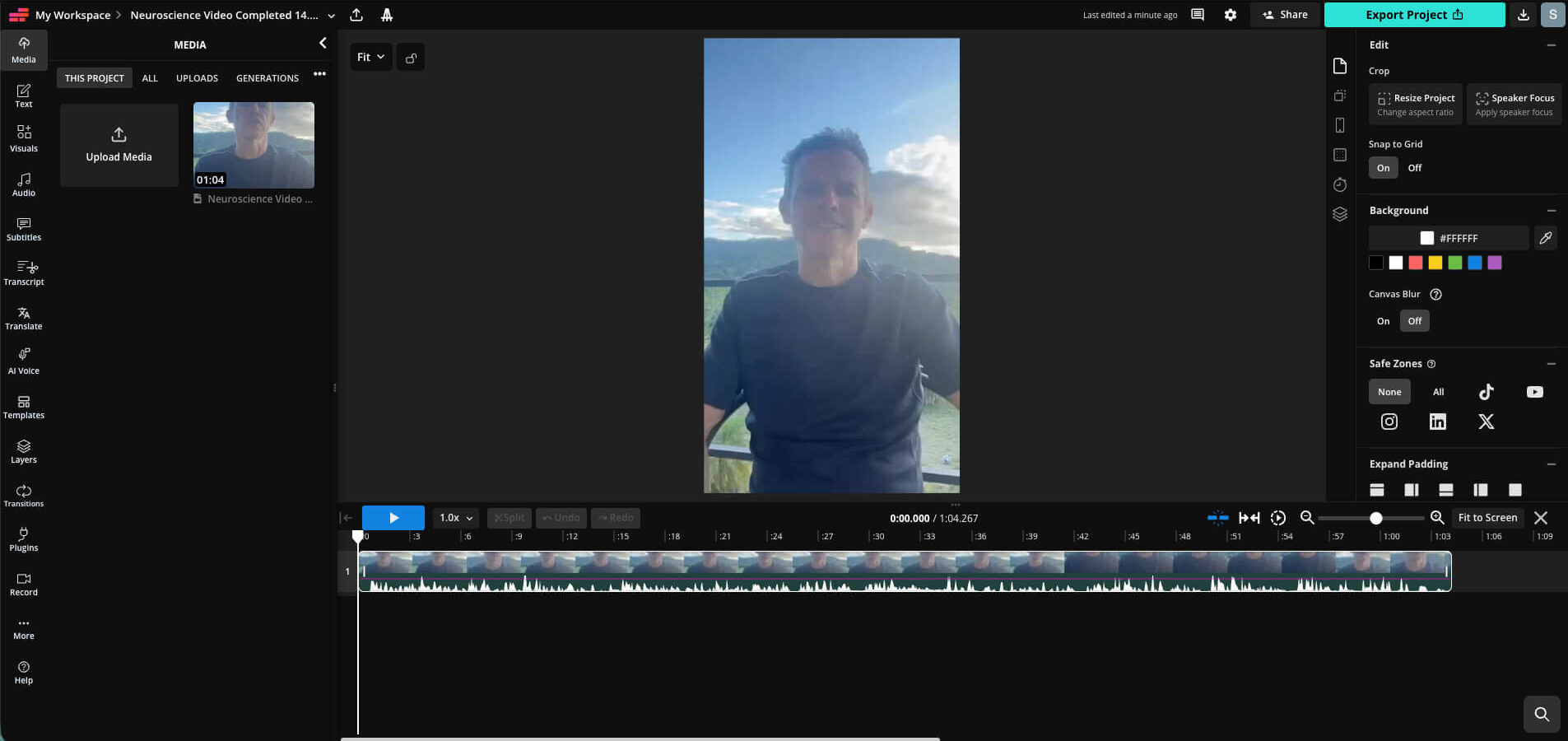
A Sneak Peek At the Interface
Here’s a screenshot of the interface for a video we’re currently working on for the Founder of the Primal Reset Project. As you can see, it’s clean, intuitive and brimming with all the editing tools you could possibly need!
A Browser-Based Editing Experience
Kapwing operates entirely in the browser, which removes many of the barriers associated with traditional video editing software. There’s no need to download large programs, manage updates, or worry about system compatibility.
This approach makes it easy to work from different devices and locations while maintaining a consistent editing experience. For remote teams, solo creators, or anyone who values flexibility, browser-based editing is a clear advantage.
Resizing Videos for Multiple Platforms
Creating a single video often means adapting it for multiple platforms, each with its own preferred format. Kapwing simplifies this process by allowing videos to be resized for common aspect ratios while keeping captions aligned and readable.
Whether you are publishing square videos for social feeds, vertical content for short-form platforms, or landscape videos for YouTube, the resizing tools reduce the need to rebuild content from scratch.
Designed for Non-Editors
One of the reasons Kapwing is easy to recommend is that it does not assume advanced editing knowledge. The interface is intuitive, and common tasks like trimming clips, adjusting timing, or exporting high-quality video are straightforward.
This makes it particularly suitable for professionals who want to focus on their message rather than on technical details. The learning curve is gentle, but the results still look polished and intentional.
Who This Tool Is Best Suited For
Kapwing is a strong option for content creators, educators, coaches, consultants, and business owners who rely on video communication. It works well for people who value clarity, accessibility, and efficiency, and who want captions to enhance understanding rather than overwhelm the viewer.
Wrapping Up
With features like automatic captions, caption translation, Smart Cut, and a wide range of built-in editing tools, Kapwing supports modern video creation without unnecessary complexity. It allows creators to produce accessible, well-paced videos while spending less time on manual edits.
For anyone looking to streamline their video workflow and improve how their content is received across platforms, Kapwing is a tool worth exploring and recommending.
Share the love